
The private AI home inventory app for insurance claims
ContentsKeeper helps you catalog your home and home contents on iPhone, iPad and Mac. Photograph a room and private, on-device AI lists what it sees and reads receipts and serial numbers. You confirm every detail, including any value estimate, then export a claim PDF and CSV when you need it.


iPhone, iPad and Mac · Free for 1 place and up to 20 items
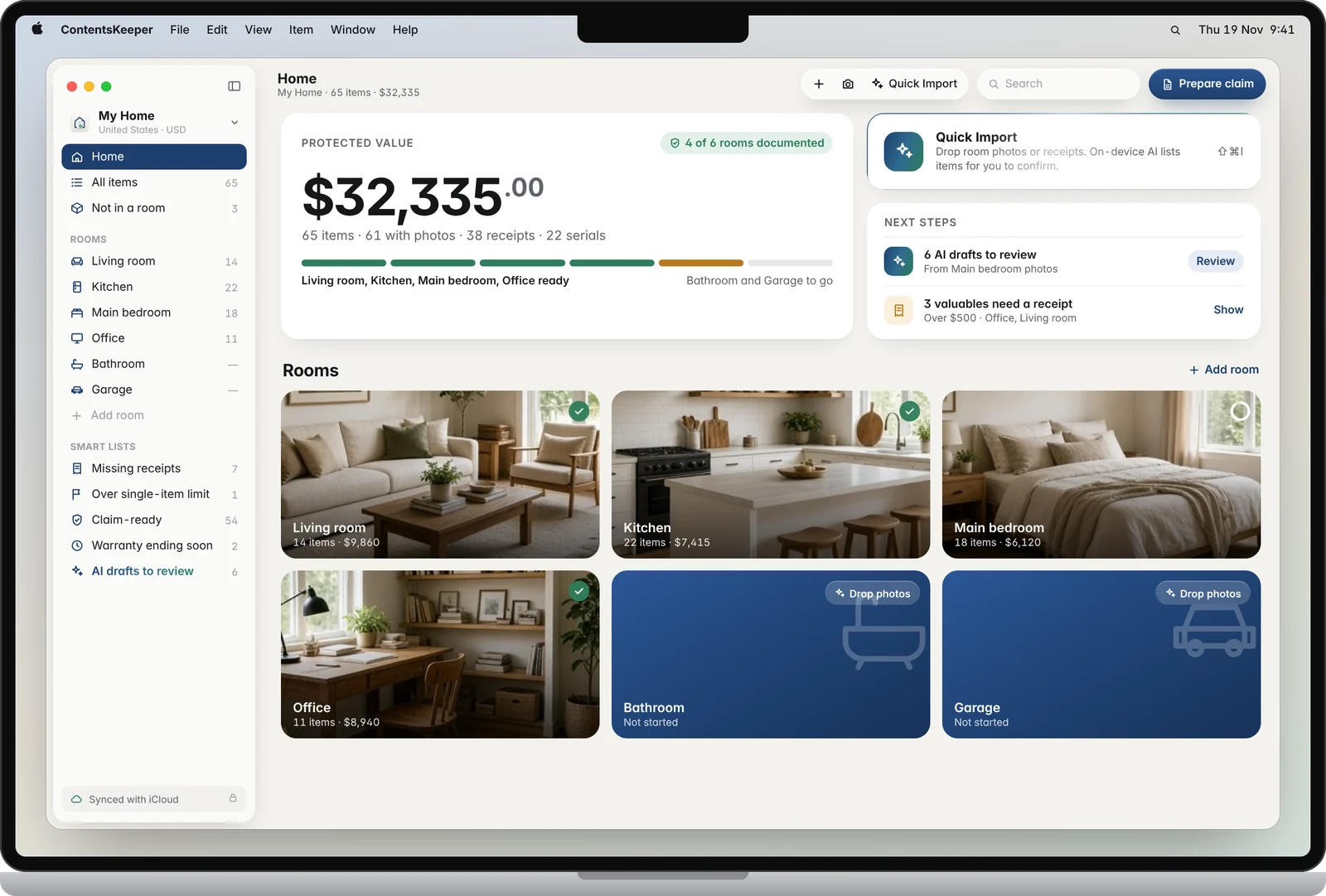
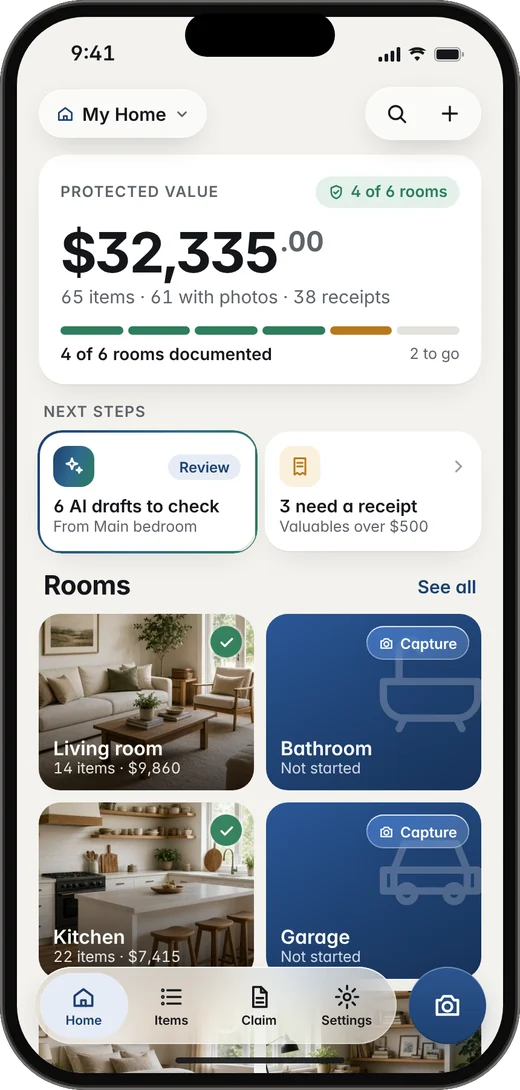
Your home inventory stays on your device.No account. No cloud uploads. Sync only through your own iCloud.
Private AI that builds your home inventory from photos
Every AI suggestion shows up as a draft you confirm. Nothing is counted as claim-ready until you say so.
Photograph a room
Take a few photos. AI spots items like the sofa, the TV and the lamp, and lists them as drafts in your household inventory.
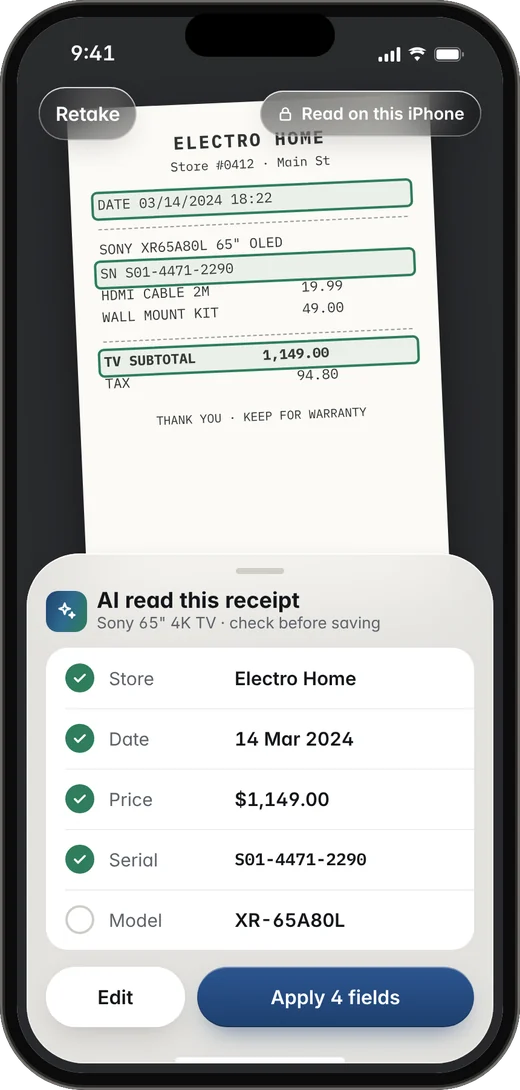
Read receipts and serial numbers
Point at a receipt or label. Store, date, price and serial number fill themselves in, on your device.
Add estimated values
Category, brand and model, plus a value range you can accept or change. Values are labelled as estimates, not appraisals.
✦ Estimate $1,150–1,400Draft your insurance claim
Fills the claim PDF and CSV, flags items missing proof, and suggests things you may have forgotten.
Value estimates use Apple Intelligence on supported devices. They are approximate and always yours to confirm. Item detection and text reading use Apple's on-device Vision framework.
How to make a home inventory for insurance
Photograph rooms on iPhone, iPad or Mac
Photograph a room in a minute, or drop photos onto the Mac app. AI turns them into draft items.
Add proof to each item
Add a value, a receipt or a serial. A green check shows when an item has the proof it needs.
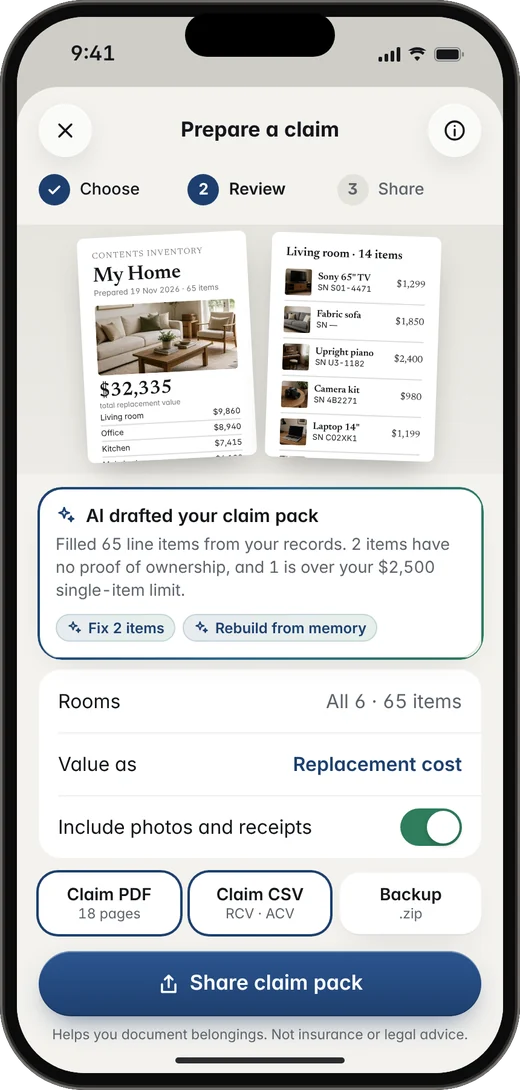
Export a claim PDF and CSV
Preview your claim for free. With Premium, export a claim PDF and an insurer-style CSV, room by room, with photos and receipts attached.
A home inventory ready for insurance claims
Insurance claim PDF
Cover page, room totals and one entry per item with photos, receipts and serial numbers.
Insurer-style inventory CSV
Qty, age, condition, price paid, replacement cost (RCV), actual cash value (ACV) and serial.
| Item | Qty | Age | Cond. | RCV | ACV* |
|---|---|---|---|---|---|
| Sony 65" TV | 1 | 2y | Good | 1,299 | 1,040 |
| Fabric sofa | 1 | 4y | Good | 1,850 | 1,110 |
| Sample total | 3,149 | 2,150 | |||
*ACV is your own estimate. Sample data for illustration, not real figures.
Room checklists after a loss
Already had a loss? Room-by-room checklists help you remember what was there.
UK home contents and single-item limits
Set your contents insurance single-item limit and see which valuables to list with your insurer.
A private home inventory. No account, no tracking.
We built ContentsKeeper so we never see your inventory. There is no server to send it to.
No account
No sign-up, no email, no password in the app.
No tracking
No ads, no analytics SDKs, no data collected by the app.
On-device private AI
Photos and receipts are analysed on your iPhone, iPad or Mac.
Sync with your iCloud
Sync runs through your private iCloud between your own devices.
Your data & backups
If you lose the phone with the house, this is how your inventory can still be there.
No account of ours
Your inventory stays on the iPhone, iPad or Mac you use. We have no server and no login.
Private iCloud sync
Signed in to iCloud? The inventory, including photos and receipts, can sync through your private iCloud. We cannot access it.
Export a PDF or CSV
With Premium, share or save a claim PDF or spreadsheet and keep it in Files, Drive or email. Export is Premium; preview is free.
Home inventory app plans
Start free. Pay yearly or once. No account, no ads. Premium unlocks iPhone, iPad and Mac.
Free
- 1 place
- Up to 20 items
- On-device AI capture
- Claim preview
Premium Yearly
- Unlimited items and places
- Claim PDF, CSV and room PDF export
- iPhone, iPad and Mac
- Family Sharing included
Premium Lifetime Best value
- Everything in Yearly
- No renewals, ever
- iPhone, iPad and Mac
- Family Sharing included
US prices shown. In the UK: Yearly £8.99, Lifetime £21.99. Prices in other countries are set by the App Store and may differ.
Home inventory questions
How do I make a home inventory for insurance?
Go room by room and photograph your belongings. For each item, add the brand or model, serial number, quantity, age, condition and a replacement value, plus a receipt if you have one. ContentsKeeper is a home inventory app that can draft this list from room photos with private, on-device AI. You confirm the details, then export a claim PDF and CSV.
What should I include in a home inventory?
Include furniture, electronics, appliances, clothing, valuables and items in sheds, garages and storage. Note brand, model, serial number, quantity, age, condition, price paid and replacement cost, and keep photos and receipts. In the UK, this is often called a home contents inventory and should be valued at replacement cost.
How do I prove ownership without receipts?
Photos, serial numbers, bank or card statements, warranties and a dated inventory all help. ContentsKeeper stores photos and serial numbers with each item and can include them in your claim PDF and CSV. We cannot promise what an insurer will accept.
What is a home contents inventory in the UK?
In the UK, contents insurance covers the belongings in your home. A home contents inventory is a room-by-room list of those items, with photos, receipts and replacement values, so you can check your cover and support a contents insurance claim. ContentsKeeper can also flag items over your policy's single-item limit so you can see which valuables to name on your policy. We are not an insurer, and this is not insurance advice.
Does this home inventory app work on iPhone and Mac?
Yes. ContentsKeeper is a native app for iPhone, iPad and Mac. The Mac app has a table view, bulk editing and drag-and-drop import. One Premium purchase covers all three, and your inventory can sync through your private iCloud.
Is my home inventory private?
Your inventory stays on your devices. AI runs on-device. The only sync is through your own private iCloud, between your devices. There is no account and no server of ours for the app. If you join the website waitlist, we store only your email to send updates and offers.
How accurate are the AI value estimates?
They are rough ranges to save you typing, always labelled "Estimate". You set the final value. They are not a valuation or an appraisal, and your insurer decides what to pay. Value estimates need a device with Apple Intelligence. Item detection and receipt reading work on current iPhone, iPad and Mac models.
Will my insurer accept the claim PDF?
ContentsKeeper helps you document proof of what you own. It is not affiliated with or endorsed by any insurer, and we cannot promise how a claim will be handled or whether a payout will be made.
Do I have to pay for the home inventory app?
No. The free plan covers 1 place, 20 items and a preview of your claim. Premium adds unlimited items and places plus claim PDF, CSV and room PDF export. Choose Yearly ($9.99 a year, renews automatically until you cancel in your Apple ID settings) or Lifetime ($24.99, paid once, never renews). Both are shared with your family through Family Sharing. In the UK: Yearly £8.99, Lifetime £21.99.